
Task #11853 (closed)
Opened 6 years ago
Closed 6 years ago
BUG: Browse button not activated
| Reported by: | pwalczysko | Owned by: | jburel |
|---|---|---|---|
| Priority: | major | Milestone: | 5.0.0 |
| Component: | Insight | Version: | 5.0.0-beta2-RC3 |
| Keywords: | n.a. | Cc: | ux@…, |
| Resources: | n.a. | Referenced By: | n.a. |
| References: | n.a. | Remaining Time: | n.a. |
| Sprint: | n.a. |
Description
In Insight, both omero4 and omero5.
When double-click on a project or dataset in the Tree, the Browse button in the top row does not become activated. It will become activated however when you click on the "plus" to expand the node at the project in the tree.
The problem is slightly hard to reproduce because of the erratic logic in which the Browse button is being highlighted. The expected behaviour is for the Browse button to be highlighted at all times when a P/D is selected,
To see the problem, try to expand a collapse couple of times the P/D by double clicking on it - watch the behaviour of the Browse button highlight.
Reported by Iain Porter during upgrade testing. The Browse button is used by him to view the images which are in the Project without having to go into particular datasets.
Attachments (1)
Change History (3)
Changed 6 years ago by pwalczysko
comment:1 Changed 6 years ago by pwalczysko
comment:2 Changed 6 years ago by jburel
- Resolution set to fixed
- Status changed from new to closed


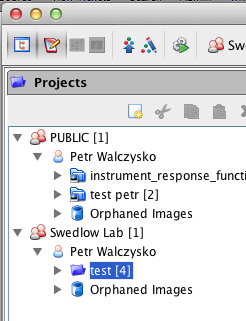
The most annoying aspect from Iain's perspective is, that when he double-clicks on a Project for the first time, it will expand all the datasets and (probably thinking "I am don with browsing") disables the browse button. But Iain would like to see the images in the Project without having to click on particular datasets and expand them. This is why the Browse button is there - but it does not work in this very situation.