
Task #12269 (closed)
Opened 5 years ago
Closed 5 years ago
RFE: Reset and Reset Default
| Reported by: | pwalczysko | Owned by: | jburel |
|---|---|---|---|
| Priority: | major | Milestone: | 5.0.3 |
| Component: | Insight | Version: | 5.0.1 |
| Keywords: | n.a. | Cc: | ux@… |
| Resources: | n.a. | Referenced By: | https://trello.com/c/Jv1L8gqY/50-default-owner-rendering-settings |
| References: | n.a. | Remaining Time: | n.a. |
| Sprint: | n.a. |
Description
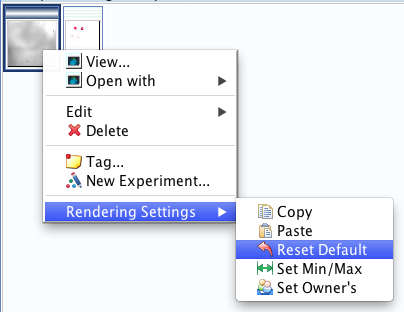
In Insight, in right-click context menu there is "Reset Default" command, which resets and saves the Rendering settings. This is in contrast with the two other Reset commands:
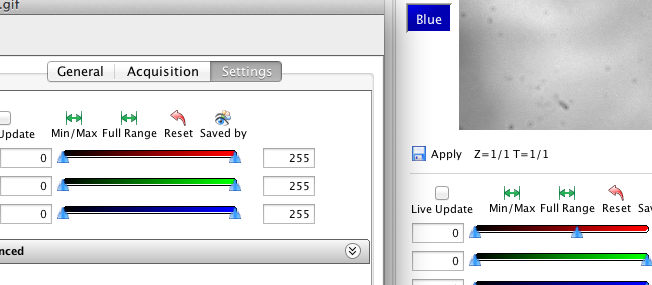
- Reset in Preview Pane
- Reset in Full Viewer / Rendering pane
Both these "Reset" commands are just resetting, the Save must be clicked separately. This is confusing, because we have 3 commands here of which 2 behave one way (Reset only) and one the other way (Reset and Save).
Suggestion - I can see two options, either
- Rename "Reset Default" from right-click menu to "Reset and Save" (=explain the difference) or
- Change the behaviour of the two "Reset" commands to Reset and Save (=unify all three commands)
Attachments (2)
Change History (8)
Changed 5 years ago by pwalczysko
Changed 5 years ago by pwalczysko
comment:1 Changed 5 years ago by pwalczysko
comment:2 Changed 5 years ago by jburel
- Referenced By set to https://trello.com/c/Jv1L8gqY/50-default-owner-rendering-settings
comment:3 Changed 5 years ago by jburel
The first suggestion is probably the most suitable since the reset action in preview matches the other actions e.g. select other settings and display.
comment:4 Changed 5 years ago by jburel
Gus: What do you think?
comment:5 Changed 5 years ago by rkferguson
@jburel, pwalczysko
I agree that the first option is the best to go with.
comment:6 Changed 5 years ago by jburel
- Resolution set to fixed
- Status changed from new to closed
Note: See
TracTickets for help on using
tickets.
You may also have a look at Agilo extensions to the ticket.



Found out during the follow-up work on https://github.com/openmicroscopy/openmicroscopy/pull/2365.