
Task #5971 (closed)
Opened 8 years ago
Closed 8 years ago
Bug: Images view, incorrect views and counts.
| Reported by: | cblackburn | Owned by: | jburel |
|---|---|---|---|
| Priority: | minor | Milestone: | Usability Backlog |
| Component: | Insight | Version: | n.a. |
| Keywords: | n.a. | Cc: | saloynton |
| Resources: | n.a. | Referenced By: | n.a. |
| References: | n.a. | Remaining Time: | n.a. |
| Sprint: | n.a. |
Description
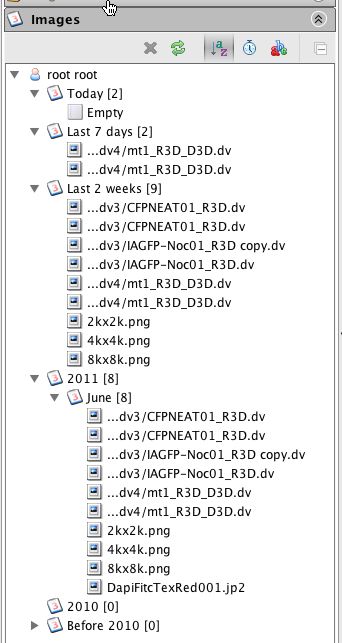
After importing two files using DropBox? I noticed that it reports 2 files for 'Today' but none are shown. Refreshing doesn't fix this. The two files are reported and shown correctly under 'Last 7 days'.
While looking at this I also noticed that the number of files reported for '2011' and 'June' are incorrect. There are 10 files in the view but a count of 8 is given. ('Last 2 weeks' has the right count.)
Attachments (2)
Change History (14)
Changed 8 years ago by cblackburn
comment:1 Changed 8 years ago by cblackburn
- Milestone changed from Unscheduled to OMERO-Beta4.3.1
- Sprint set to 2011-07-07 (1)
comment:2 Changed 8 years ago by jburel
comment:3 Changed 8 years ago by cblackburn
It could be but as the files were both shown under 'Last 7 Days' but not under 'Today' (on the day they were imported) I'm not sure why that would happen. I'm investigating #5972 at the moment. Once that is fixed I'll try to reproduce.
comment:4 Changed 8 years ago by saloynton
- Cc saloynton added
comment:5 Changed 8 years ago by cblackburn
I've re-tested this and I see the same problem with a single successful import (ie no duplicate import problem). If I use DropBox, bin/omero import or bin/omero import -d the file imports successfully but does not show up under 'Today' The count for 'Today' is correctly updated on each import and the images show up under 'Last 7 days'.
comment:6 Changed 8 years ago by cblackburn
If I restart Insight the previously imported images now show up under 'Today'
comment:7 Changed 8 years ago by jburel
sounds more like a refresh problem.
I think I already have a ticket for refresh in images view.
comment:8 Changed 8 years ago by jburel
- Milestone changed from OMERO-Beta4.3.1 to Usability Backlog
- Sprint 2011-07-07 (1) deleted
Changed 8 years ago by cblackburn
comment:9 Changed 8 years ago by cblackburn
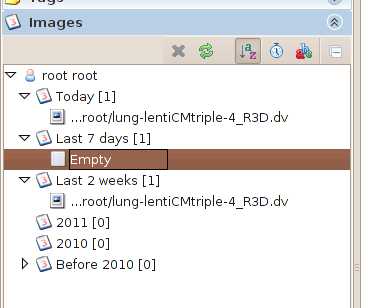
Screenshot from Ubuntu added for information. Here it is the Last 7 Days that shows empty while Today is correct.
comment:10 Changed 8 years ago by saloynton
Referencing ticket #3777 has changed sprint.
comment:11 Changed 8 years ago by jburel
I think the problem is now fixed in 4.3.3
Colin, could you confirm?
comment:12 Changed 8 years ago by cblackburn
- Resolution set to fixed
- Status changed from new to closed
Tested using DropBox? and Insight import on Ubuntu client. The counts are now correct.



Could it be a problem related to a companion file and drop box?
If I import the image using the client everything works as expected.