
Task #8501 (closed)
Opened 7 years ago
Closed 7 years ago
Bug: Icon disabling logic broken in IE8
| Reported by: | cxallan | Owned by: | web-team@… |
|---|---|---|---|
| Priority: | blocker | Milestone: | OMERO-4.4 |
| Component: | Web | Version: | n.a. |
| Keywords: | testing,phase1,ie | Cc: | web-team@… |
| Resources: | n.a. | Referenced By: | n.a. |
| References: | n.a. | Remaining Time: | n.a. |
| Sprint: | n.a. |
Description
Whatever logic, JavaScript?, CSS or otherwise that is responsible for disabling or enabling various icons in the toolbar is not working in IE8.
Attachments (2)
Change History (9)
Changed 7 years ago by cxallan
comment:1 Changed 7 years ago by atarkowska
- Cc atarkowska added
- Owner changed from atarkowska to dgaudioso
This is caused by opacity. Every css should have
filter:alpha(opacity=50); /* For IE8 and earlier */
in addition to opacity
comment:2 Changed 7 years ago by jburel
- Cc dgaudioso added
- Owner changed from dgaudioso to wmoore
comment:3 Changed 7 years ago by atarkowska
- Cc web-team@… added; wmoore atarkowska dgaudioso removed
- Owner wmoore deleted
comment:4 Changed 7 years ago by cxallan
- Keywords ie added
- Owner set to rkferguson
comment:5 Changed 7 years ago by atarkowska
- Keywords testing phase1 added
comment:6 Changed 7 years ago by saloynton
- Owner changed from rkferguson to web-team@…
comment:7 Changed 7 years ago by wmoore
- Resolution set to worksforme
- Status changed from new to closed
As far as I can see, the UI, toolbar and disabled appearance have changed completely since this ticket was created (see screenshots). I think I can close this, right?
Note: See
TracTickets for help on using
tickets.
You may also have a look at Agilo extensions to the ticket.


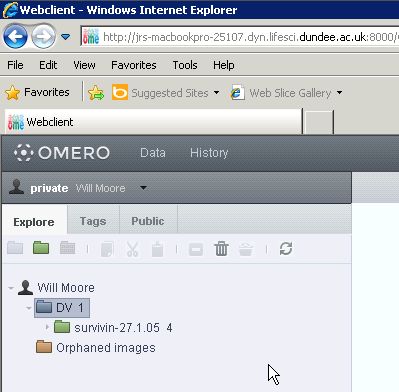
Screenshot of the behaviour