
Task #9026 (closed)
RFE: Change password UI improvements
| Reported by: | wmoore | Owned by: | atarkowska |
|---|---|---|---|
| Priority: | minor | Milestone: | OMERO-4.4 |
| Component: | Web | Version: | n.a. |
| Keywords: | testing,phase1 | Cc: | ux@… |
| Resources: | n.a. | Referenced By: | n.a. |
| References: | n.a. | Remaining Time: | n.a. |
| Sprint: | n.a. |
Description
From #8852... screen-shot http://trac.openmicroscopy.org.uk/ome/attachment/ticket/8852/Webadmin%20Password%20Change%20Layout.png
Please can you make some changes to wording and other elements to try and improve the usability of this - on working it through with Scott we both found it very confusing.
I have attached a mock-up of what we would like the dialogs to look/read like (above):
- Please can the feedback be level with the button as shown.
- Please can they be sticky - not disappear after 5 seconds.
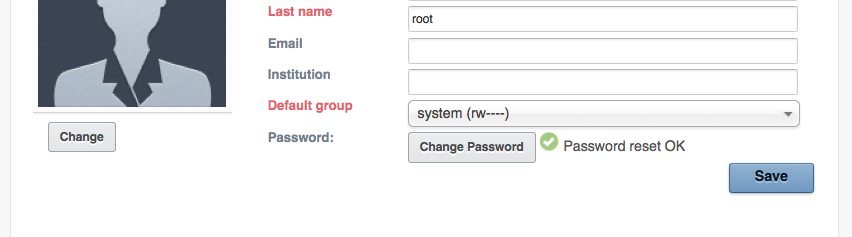
- Success message: “✔ New Password accepted” in green (the tick is a bonus if you can do it easily)
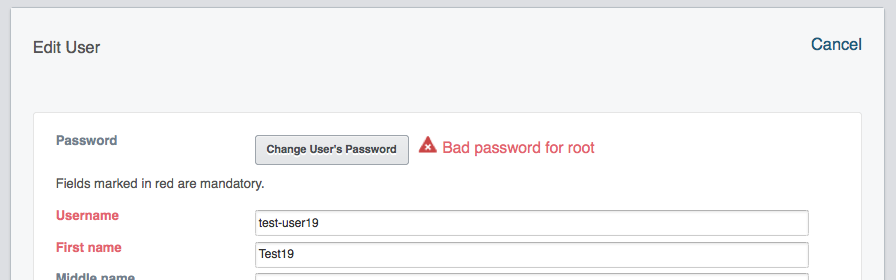
- Failure message: “✘ Change failed - Admin Password incorrect” in red (again X is bonus if you can do it easily)
- Red border on “Change User’s Password” button to indicate it has to be done again.
Attachments (2)
Change History (9)
comment:1 Changed 7 years ago by wmoore
- Cc rkferguson added
- Keywords testing phase1 added
comment:2 Changed 7 years ago by jburel
- Cc ux@… added; rkferguson removed
comment:3 Changed 7 years ago by eehill
- Owner changed from web-team@… to atarkowska
- Summary changed from Change password UI improvements to RFE: Change password UI improvements
comment:4 Changed 7 years ago by wmoore
Don't fade out message: https://github.com/aleksandra-tarkowska/openmicroscopy/commit/238ad15f51ef4c46f644b7e04c161883f255d3ba
Bit more work for javascript to distinguish between success and failure messages.
comment:5 Changed 7 years ago by saloynton
Tested with build OMERO-merge-green 113
comment:6 Changed 7 years ago by wmoore
- Resolution set to fixed
- Status changed from new to closed
Both the "User Settings" form and "Edit User" (admin) forms show a tick or cross with Password change success / failure (see screen shots).
Adding the red border to the button is going to be a bit more pain, and I don't think it's really needed, so I'm going to close this.
comment:7 Changed 7 years ago by saloynton
In testing this Will I been able to enter my current password as 123 (which it is not) then enter the new and confirm password again 123 and on clicking ok it identifies the current and new password as being the same. Is this the correct logic?



Assigning this RFE to you Ola, after discussion with Scott. Not urgent, but would be good to take into account when you're working on webadmin forms.