
Task #9699 (closed)
Opened 7 years ago
Closed 6 years ago
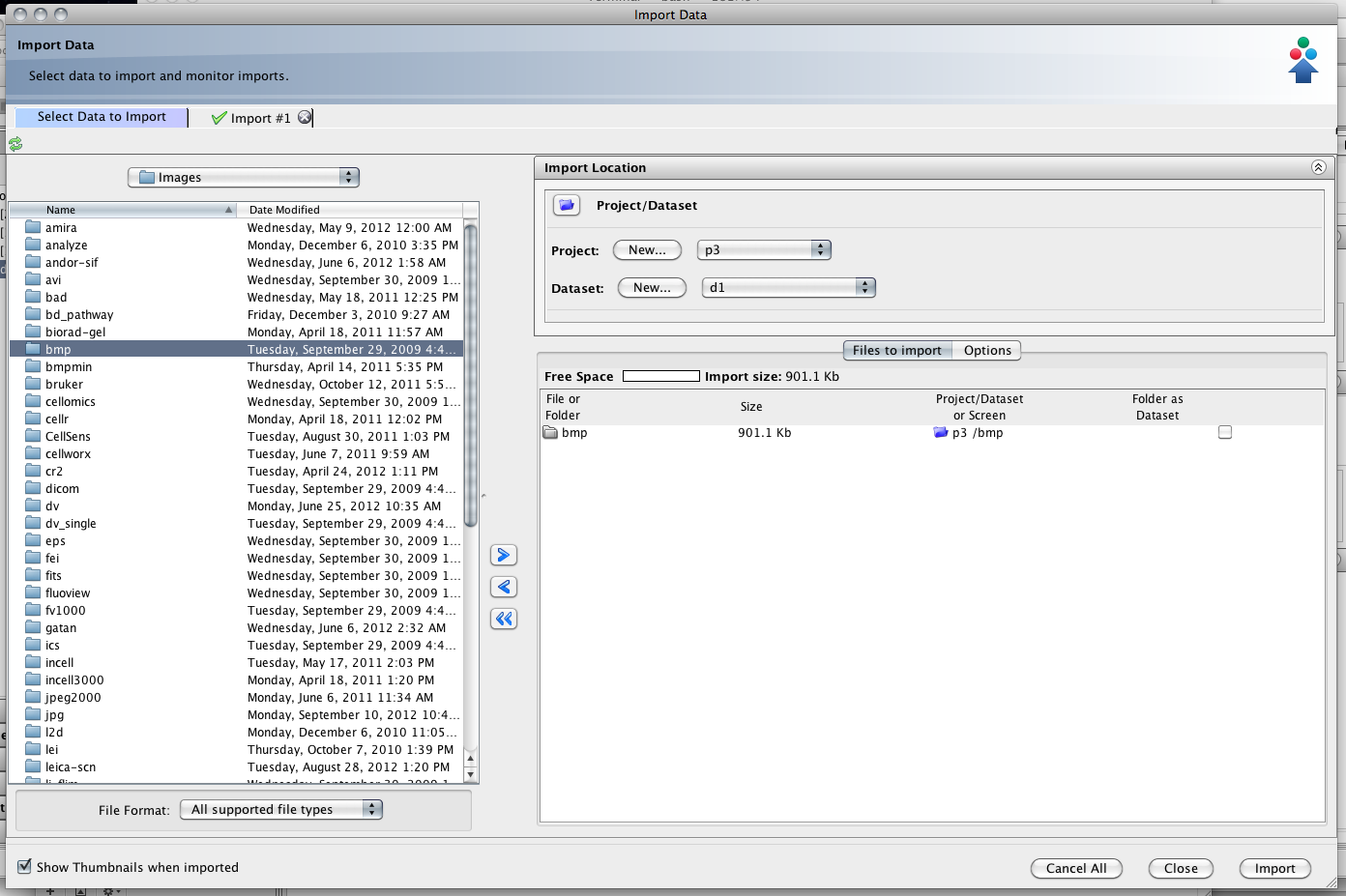
BUG: Folder name shows as dataset in import window
| Reported by: | cblackburn | Owned by: | jburel |
|---|---|---|---|
| Priority: | major | Milestone: | 5.0.0-rc1 |
| Component: | Insight | Version: | 4.4.9 |
| Keywords: | n.a. | Cc: | ux@… |
| Resources: | n.a. | Referenced By: | n.a. |
| References: | n.a. | Remaining Time: | n.a. |
| Sprint: | OMERO 5 Beta 2 (1) |
Description
If I import a folder of images into a P/D the folder name shows instead of the Dataset in the queue item. The images import into the correct location without problem.
Attachments (1)
Change History (17)
Changed 7 years ago by cblackburn
comment:1 Changed 7 years ago by jburel
- Cc jburel added
- Owner changed from jburel to sylittlewood
comment:2 Changed 7 years ago by jburel
- Priority changed from minor to major
- Sprint set to 2012-12-18 (3)
comment:3 Changed 7 years ago by jburel
- Sprint changed from 2012-12-18 (3) to 2013-01-15 (4)
Moved from sprint 2012-12-18 (3)
comment:4 Changed 7 years ago by jburel
- Sprint changed from 2013-01-15 (4) to 2013-02-12 (5)
Moved from sprint 2013-01-15 (4)
comment:5 Changed 6 years ago by jburel
- Sprint changed from 2013-02-12 (5) to 2013-03-12 (6))
Moved from sprint 2013-02-12 (5)
comment:6 Changed 6 years ago by jburel
- Sprint changed from 2013-03-12 (6)) to 2013-04-09 (7))
Moved from sprint 2013-03-12 (6))
comment:7 Changed 6 years ago by jburel
- Sprint changed from 2013-04-09 (7)) to 2013-05-07 (8)
Moved from sprint 2013-04-09 (7))
comment:8 Changed 6 years ago by sylittlewood
- Owner changed from sylittlewood to jburel
comment:9 Changed 6 years ago by jburel
- Milestone changed from OMERO-4.4.x to OMERO-4.4.9
- Sprint changed from 2013-05-07 (8) to Blocker 4.4.9 (1)
Moved from sprint 2013-05-07 (8)
comment:10 Changed 6 years ago by jburel
- Cc ux@… added; jburel removed
- Milestone changed from OMERO-4.4.x to 5.0.0-beta2
- Sprint set to OMERO 5 Beta 2 (1)
- Version set to 4.4.9
Need to be fixed this time.
comment:11 Changed 6 years ago by mtbcarroll
- Owner changed from jburel to mtbcarroll
comment:12 Changed 6 years ago by mtbcarroll
There is an issue with FileSelectionTable.addFiles:
	if (f.isDirectory()) {
		value = f.getName();
		v = fad;
		if (model.getType() == Importer.SCREEN_TYPE) {
			value = null;
		}
	} else {
		if (fad) {
			value = f.getParentFile().getName();
			v = true;
			element.setToggleContainer(v);
		}
	}
I am not sure how sufficiently these conditionals' actions cover the truth table for fad, f.isDirectory(), model.getType() == Importer.SCREEN_TYPE, nor even which combinations are possible. It is clear that the bug arises from value being set to the directory name when those are false, true, false, but I am not sure if any other combinations also give a wrong outcome, and I don't know if it is important that value does get set in this case and that nulling it won't have some bad side effect. @jburel, any thoughts?
comment:13 Changed 6 years ago by mtbcarroll
- Status changed from new to accepted
comment:14 Changed 6 years ago by jburel
Mark do you want me to have a look? Few things were not cleaned up after the first round of major changes.
comment:15 Changed 6 years ago by mtbcarroll
- Owner changed from mtbcarroll to jburel
Yes, I'd welcome that, thank you. If I adjust the quoted conditional then the bug is fixed. If that's the right thing to do, then I'm worried about if the conditional is wrong for other cases too. If that's the wrong thing to do, then perhaps it's the rendering of the DataNodeElement that needs adjusting instead.
comment:16 Changed 6 years ago by jburel
- Resolution set to fixed
- Status changed from accepted to closed


Passing on to elwood as part of the work done on the import component.