
Task #9878 (closed)
Opened 7 years ago
Closed 6 years ago
Bug: IE8: blue buttons
| Reported by: | khgillen | Owned by: | wmoore |
|---|---|---|---|
| Priority: | major | Milestone: | 5.0.0-rc1 |
| Component: | Web | Version: | 4.4.9 |
| Keywords: | n.a. | Cc: | ux@… |
| Resources: | n.a. | Referenced By: | n.a. |
| References: | n.a. | Remaining Time: | n.a. |
| Sprint: | n.a. |
Description
Comment Removal confirm dialogue OK button very dark blue, text unreadable.
Attachments (2)
Change History (20)
Changed 7 years ago by khgillen
comment:1 Changed 7 years ago by wmoore
- Summary changed from Bug: Comment Removal dialogue colour strange/unreadable button text - web IE8 to Bug: IE8: blue buttons
The blue background is always added to the first of the dialog buttons, regardless of number, even though all buttons have the same css, styles etc.
comment:2 Changed 7 years ago by jburel
- Sprint changed from 2012-11-20 (2) to 2012-12-18 (3)
Moved from sprint 2012-11-20 (2)
comment:3 Changed 7 years ago by jburel
- Sprint changed from 2012-12-18 (3) to 2013-01-15 (4)
Moved from sprint 2012-12-18 (3)
comment:4 Changed 7 years ago by jburel
- Sprint changed from 2013-01-15 (4) to 2013-02-12 (5)
Moved from sprint 2013-01-15 (4)
comment:5 Changed 6 years ago by jburel
- Sprint changed from 2013-02-12 (5) to 2013-03-12 (6))
Moved from sprint 2013-02-12 (5)
comment:6 Changed 6 years ago by jburel
- Sprint changed from 2013-03-12 (6)) to 2013-04-09 (7))
Moved from sprint 2013-03-12 (6))
comment:7 Changed 6 years ago by jburel
- Sprint changed from 2013-04-09 (7)) to 2013-05-07 (8)
Moved from sprint 2013-04-09 (7))
comment:8 Changed 6 years ago by jburel
- Milestone changed from OMERO-4.4.x to OMERO-4.4.9
- Sprint changed from 2013-05-07 (8) to Blocker 4.4.9 (1)
Moved from sprint 2013-05-07 (8)
comment:9 Changed 6 years ago by jburel
Referencing ticket #8713 has changed sprint.
comment:10 Changed 6 years ago by jburel
- Milestone changed from OMERO-4.4.x to 5.0.0-beta2
- Priority changed from minor to major
- Version set to 4.4.9
Moving to Beta2 for review. Close when appropriate.
comment:11 Changed 6 years ago by pwalczysko
Win XP laptop, IE8, on gretzky, develop. The button does go blue only AFTER you have pressed it (tried to Delete an image). When the window pops up, the buttons are okay. I think this is not a problem.
comment:12 Changed 6 years ago by jburel
- Resolution set to invalid
- Status changed from new to closed
Thanks Petr for the review.
comment:13 Changed 6 years ago by khgillen
On my Win7 VM I still see this on Gretzky, trying to add a tag to an image, as soon as I hit add tag, the dialogue that pops up has a blue button. After I press a button, it goes away. Then it's as Petr describes, only blue when the button is pressed down. But starting a new private browsing session and the blue button on first load is reproduced.
comment:14 Changed 6 years ago by pwalczysko
Hm, yes, the blue buttons in general on IE8 are NOT fixed. There were many other cases like the one studied here (see for example Kenny's comment).
comment:15 Changed 6 years ago by pwalczysko
I can repeat the workflow of Kenny with the Add Tag. The button in this case is really blue BEFORE you use it.
comment:16 Changed 6 years ago by pwalczysko
- Resolution invalid deleted
- Status changed from closed to reopened
comment:17 Changed 6 years ago by pwalczysko
Reopened. Feel free to downgrade the priority or shift as necessary.
comment:18 Changed 6 years ago by jburel
- Resolution set to duplicate
- Status changed from reopened to closed
duplicate see #9886


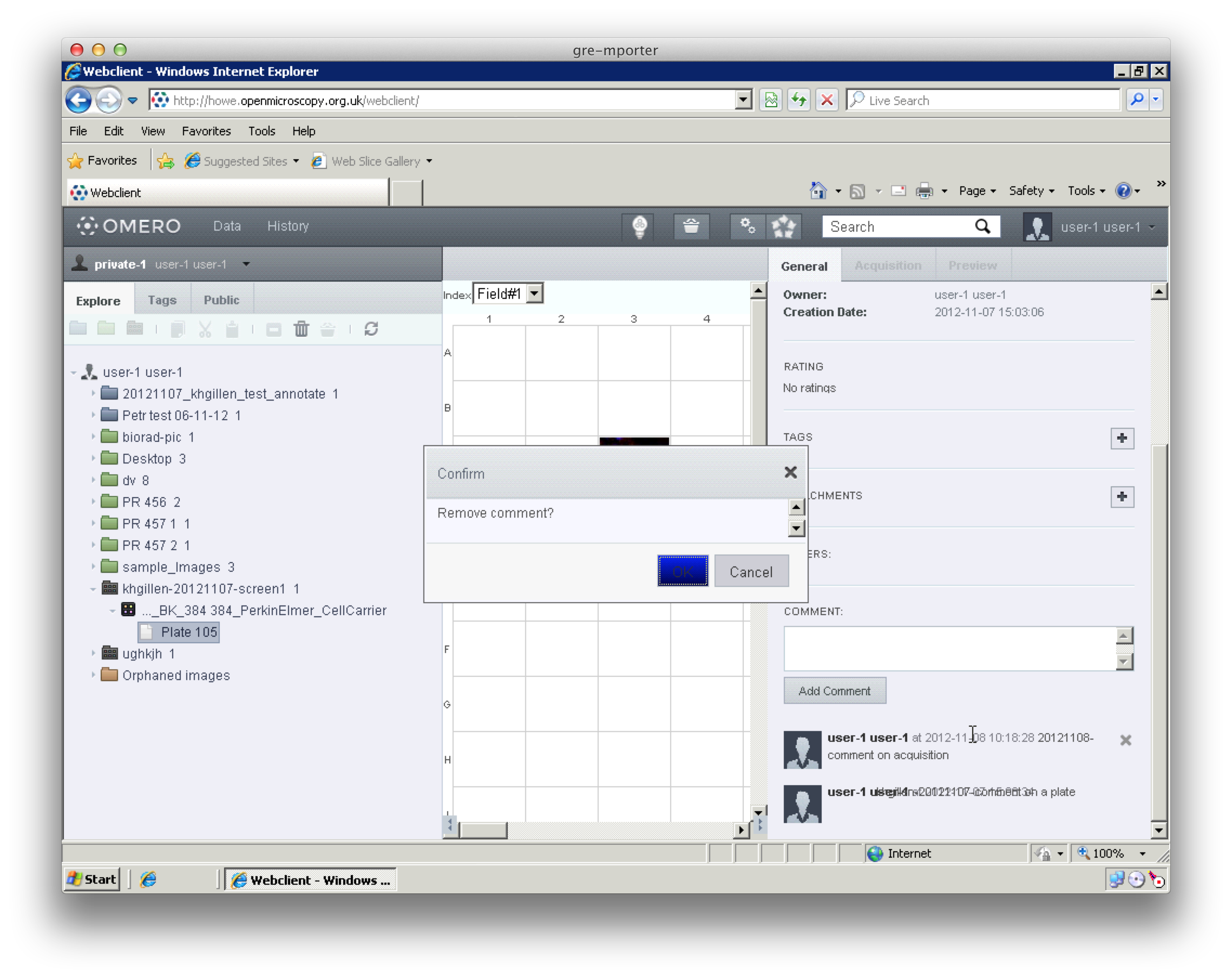

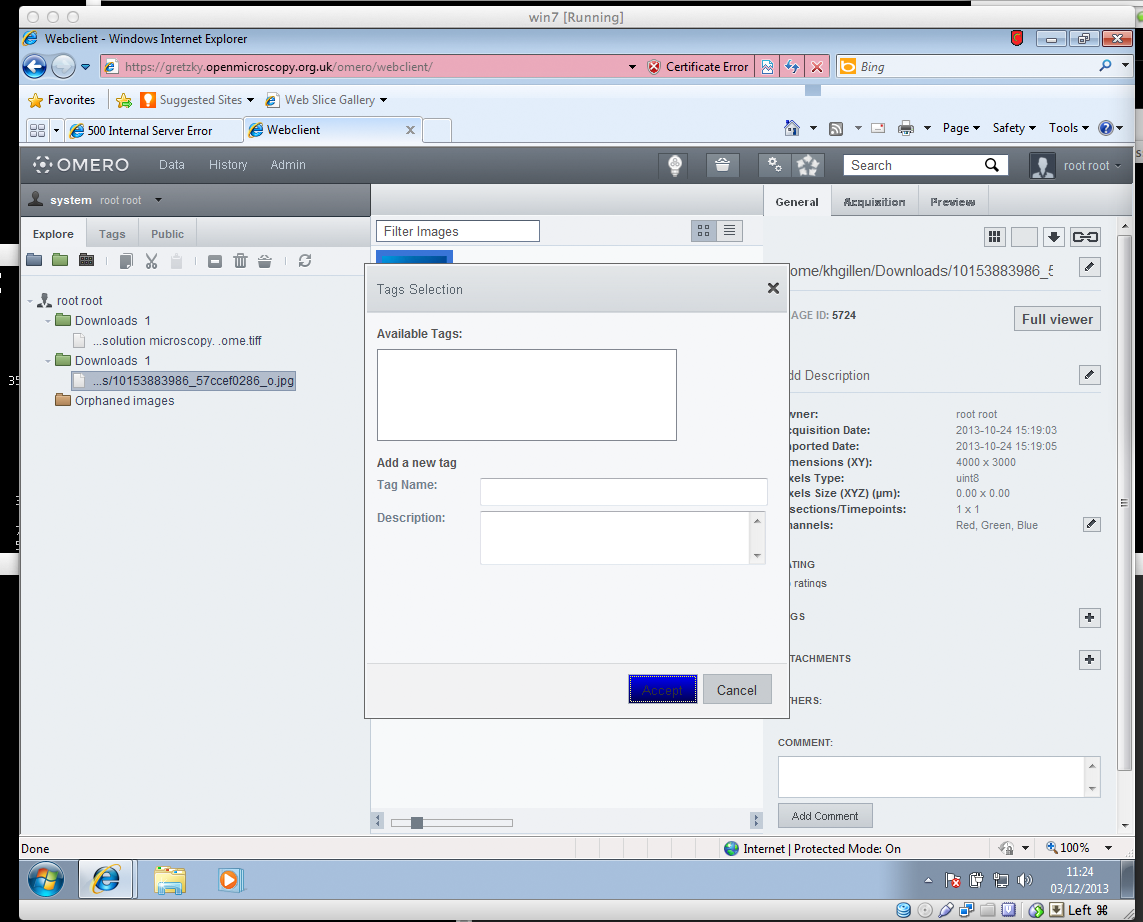
Dialogue button blue text unreadable screenshot